Best Way to Charge Your Battery (Phone, Tablet and Laptop)
Are you charging your phone or laptop the right way to get the most out of your battery, or are your charging habits killing it? 💀
Does your battery drain too quickly all the time?🪫
Ask Yourself:
- ✔️ Do you want your battery to last as long as possible over the lifetime of your device? (To prevent early battery wear.)
- ✔️ Or do you want your battery to last as long as possible each day—without worrying about long-term battery health? (To maximize daily use, even if it wears out faster.)
Let’s find out which user you are—and explore the best way to charge your phone, tablet, or laptop based on your needs.
📱 I Want to Protect My Battery and Make It Last for Years!
If this is you, follow these steps to extend your battery’s overall lifespan and prevent early wear.
- Keep your battery between 20-80% – Avoid letting it drop below 20% or charging it to 100% too often.
- Don’t charge overnight (if possible) – Keeping your phone or laptop at 100% for hours can stress the battery.
- Use a high-quality charger & cable – Apple-certified (MFi) or manufacturer-approved cables help prevent overheating. See Best Rated Brands further down this post.
🔹 Battery Health Features on Laptops
Many Windows laptops (such as Dell, Lenovo, HP) and MacBooks have built-in battery health settings that help reduce wear over time:
- Dell XPS, Latitude, Alienware, Precision, Inspiron – Use Dell Power Manager to set charge limits.
- Lenovo ThinkPad, Legion, Yoga, IdeaPad – Enable Battery Charge Threshold in Lenovo Vantage software.
- HP Spectre, EliteBook, Envy X360, Omen – Use HP Battery Health Manager in BIOS settings.
- MacBook Pro & MacBook Air – Enable Optimized Battery Charging & Battery Health Management in System Settings → Battery (macOS).
⚡ I Want My Battery to Last All Day—No Matter the Consequences!
If this is you, and you want the most battery life per charge, follow these steps to maximize daily usage while minimizing long-term damage:
- Charge to 100%, but don’t leave it plugged in overnight for hours and hours: Modern iPhones and Androids slow down charging near 100% to protect the battery.
- Use battery-saving features: Enable Low Power Mode (iPhone) or Battery Saver (Android).
- Reduce screen brightness: Close background apps to extend battery life per charge.
- Don’t let your battery fall below 20%: Avoid letting it drop below 20%, as this puts stress on the battery and reduces its lifespan.
🔌 Best Rated Brands for Phone Charging Cables
For fast, reliable, and safe charging, these top-rated brands offer high-quality cables for iPhones, Androids, tablets, and laptops:
💡 Using a high-quality charging cable helps protect your device from overheating, slow charging, and early battery failure!
🪫 I’m Already Following the Best Charging Guidelines, But My Battery is Still Dying Too Fast! 🪫
If your battery still drains too quickly, it may be time for a replacement. We offer battery replacements for all major electronic devices, including:
- ✅ iPhones (iPhone 11, 12, 13, 14, 15, SE & more)
- ✅ Samsung Galaxy, Google Pixel, OnePlus, and Android phones
- ✅ MacBook Pro & MacBook Air (All models)
- ✅ Windows Laptops (Dell, HP, Lenovo, ASUS, Acer, MSI, & more)
- ✅ Tablets including iPads, Samsung Galaxy Tab, Microsoft Surface
- ✅ Portable Gaming Consoles like Samsung Gear, Nintendo Switch, Lenovo Legion Go, Steam Deck, Asus ROG Ally
- ✅ Much more! If it has a battery, we can replace it.
💡 Let us upgrade you to a higher-capacity battery for even more daily usage time!
📍 Visit Restore Computer Repair – 8701 Harford Rd, Parkville, MD 21234 | 📞 443-725-5050
⚠️ The Dangers of Not Replacing A Failing Battery: Battery Swelling – Causes, Dangers, and Warning Signs
Lithium-ion batteries can become dangerous when they swell. Here’s why it happens and why you should never ignore the symptoms:
- Overcharging: Keeping your device plugged in too long.
- Excessive heat: Leaving your phone or laptop in a hot car.
- Old or damaged batteries: Natural degradation over time.
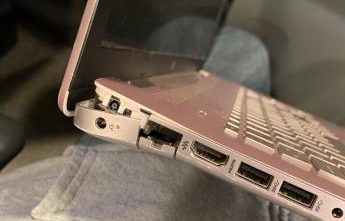
- Casing coming apart: As the battery starts to swell, it forces the casing (and sometimes the screen) of the phone, tablet or laptop to break open.
💡 If you notice a swollen battery, call or come into our shop immediately so we can get that battery replaced ASAP!


📢 Baltimore County Fire Department Warns About Lithium-Ion Battery Dangers
Lithium-ion battery fires are becoming a growing concern in Baltimore County. In a public safety alert, the Baltimore County Fire Department highlighted the dangers of these batteries, which power smartphones, laptops, e-bikes, and other electronics. They emphasized that improper charging, damage, or disposal can cause overheating, explosions, and fires.
🔥 Fire officials urge residents to:
- Never charge batteries overnight or near flammable materials
- Use manufacturer-approved chargers to prevent overheating
- Stop using batteries that show signs of swelling or damage
For more details, visit the Baltimore County Fire Department’s official post.
🛠 Need a Battery Replacement? We Can Help!
If your battery still drains too quickly, we offer fast, professional battery replacements for:
- ✅ iPhones (All models)
- ✅ Samsung Galaxy, Google Pixel, OnePlus
- ✅ MacBook Pro & MacBook Air (All models)
- ✅ Windows Laptops (Dell, HP, Lenovo, ASUS, Acer, MSI, & more)
📍 Visit Restore Computer Repair – 8701 Harford Rd, Parkville, MD 21234 | 📞 443-725-5050